This article is based on Chinmoy’s post.
By default all the pages in Whitespace Pro use full content layout without a sidebar. If you would like to add a right sidebar (Primary) to all singular entries like the individual Pages and Posts, follow along.
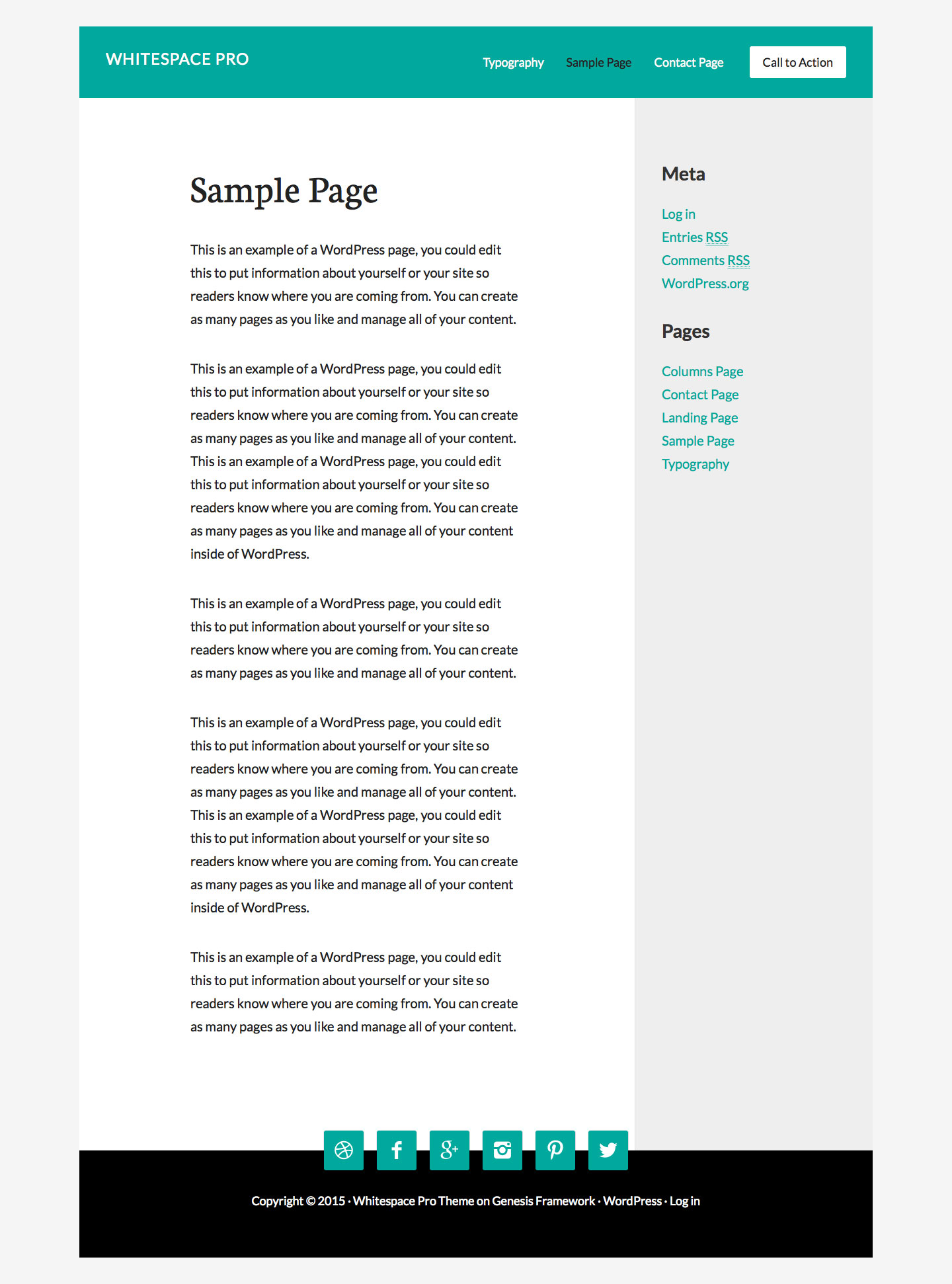
Step 1
In functions.php replace
This file contains hidden or bidirectional Unicode text that may be interpreted or compiled differently than what appears below. To review, open the file in an editor that reveals hidden Unicode characters.
Learn more about bidirectional Unicode characters
| //* Unregister layout settings | |
| genesis_unregister_layout( 'content-sidebar' ); | |
| genesis_unregister_layout( 'sidebar-content' ); | |
| genesis_unregister_layout( 'content-sidebar-sidebar' ); | |
| genesis_unregister_layout( 'sidebar-sidebar-content' ); | |
| genesis_unregister_layout( 'sidebar-content-sidebar' ); |
with
This file contains hidden or bidirectional Unicode text that may be interpreted or compiled differently than what appears below. To review, open the file in an editor that reveals hidden Unicode characters.
Learn more about bidirectional Unicode characters
| //* Unregister layout settings | |
| // genesis_unregister_layout( 'content-sidebar' ); | |
| genesis_unregister_layout( 'sidebar-content' ); | |
| genesis_unregister_layout( 'content-sidebar-sidebar' ); | |
| genesis_unregister_layout( 'sidebar-sidebar-content' ); | |
| genesis_unregister_layout( 'sidebar-content-sidebar' ); |
Step 2
replace
This file contains hidden or bidirectional Unicode text that may be interpreted or compiled differently than what appears below. To review, open the file in an editor that reveals hidden Unicode characters.
Learn more about bidirectional Unicode characters
| //* Unregister sidebars | |
| unregister_sidebar( 'sidebar' ); | |
| unregister_sidebar( 'sidebar-alt' ); |
with
This file contains hidden or bidirectional Unicode text that may be interpreted or compiled differently than what appears below. To review, open the file in an editor that reveals hidden Unicode characters.
Learn more about bidirectional Unicode characters
| //* Unregister sidebars | |
| // unregister_sidebar( 'sidebar' ); | |
| unregister_sidebar( 'sidebar-alt' ); |
Step 3
replace
This file contains hidden or bidirectional Unicode text that may be interpreted or compiled differently than what appears below. To review, open the file in an editor that reveals hidden Unicode characters.
Learn more about bidirectional Unicode characters
| //* Force full-width-content layout setting | |
| add_filter( 'genesis_site_layout', '__genesis_return_full_width_content' ); |
with
This file contains hidden or bidirectional Unicode text that may be interpreted or compiled differently than what appears below. To review, open the file in an editor that reveals hidden Unicode characters.
Learn more about bidirectional Unicode characters
| // Force content-sidebar layout setting to all singular pages | |
| add_action( 'get_header', 'sk_force_layout' ); | |
| function sk_force_layout() { | |
| if ( ! is_singular() ) { | |
| return; | |
| } | |
| // Force content-sidebar layout setting | |
| add_filter( 'genesis_pre_get_option_site_layout', '__genesis_return_content_sidebar' ); | |
| } |
Step 4
Add the following in Whitespace Pro’s style.css:
This file contains hidden or bidirectional Unicode text that may be interpreted or compiled differently than what appears below. To review, open the file in an editor that reveals hidden Unicode characters.
Learn more about bidirectional Unicode characters
| .content-sidebar .content { | |
| float: left; | |
| width: 70%; | |
| } | |
| .sidebar-primary { | |
| background: #eee; | |
| float: right; | |
| width: 30%; | |
| padding: 100px 0; | |
| border-left: 1px solid #e2e2e2; | |
| } | |
| .sidebar-primary .widget { | |
| padding: 0 40px; | |
| } | |
| .sidebar-primary h4.widgettitle { | |
| color: #333; | |
| font-size: 28px; | |
| } | |
| .content-sidebar-wrap { | |
| overflow: hidden; | |
| } | |
| .content-sidebar-wrap .content, | |
| .content-sidebar-wrap .sidebar { | |
| margin-bottom: -99999px; | |
| padding-bottom: 99999px; | |
| } | |
| @media only screen and (max-width: 960px) { | |
| .content-sidebar .content, | |
| .sidebar-primary { | |
| width: 100%; | |
| float: none; | |
| } | |
| .content-sidebar-wrap .content, | |
| .content-sidebar-wrap .sidebar { | |
| margin-bottom: 0; | |
| padding-bottom: 0; | |
| } | |
| .content-sidebar-wrap .sidebar { | |
| padding: 60px 0; | |
| } | |
| } |
In Genesis theme settings make sure full width content layout continues to be the default.
